
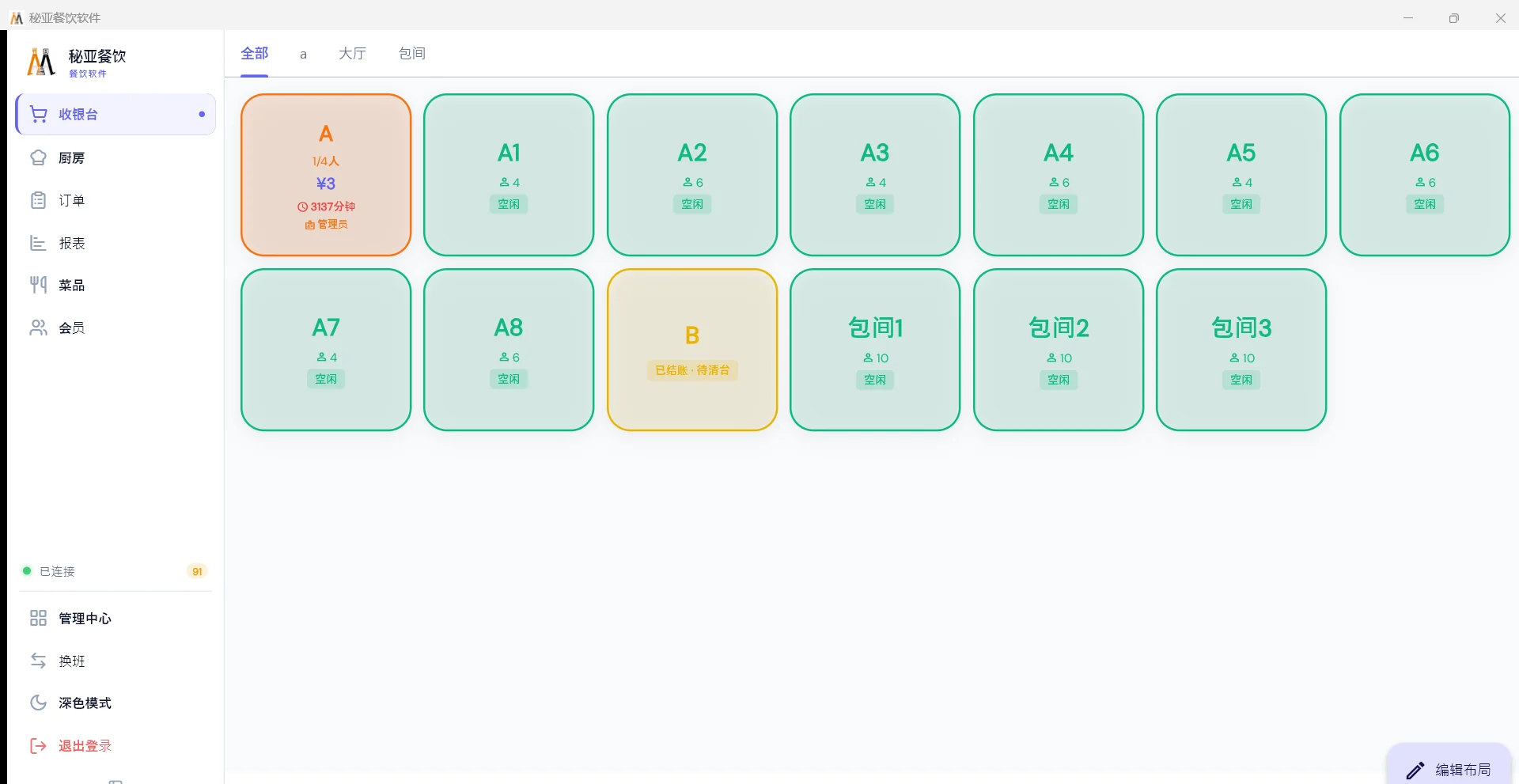
The floor map is the product
Every table carries one of four states — free, occupied, needs clearing, reserved — in a colour you can read from across the room. An occupied table shows how many people are seated, what they have spent so far, and how long they have been there. Once a seating runs long the card turns red, which is your prompt to either sell them dessert or start turning the table.
That single screen does more for a weekend service than any report you read on Monday, because it changes decisions while there are still decisions to make. A host who can see that three tables are on dessert and two are reserved for 20:30 seats the queue differently from one who is walking the floor to find out.
The three requests that break a service
- Move us to the window
- Long-press the table card, choose move. The whole open bill goes with them — every dish, every modifier, every note the kitchen already has — and the original table returns to free. The kitchen does not need telling; it is the same bill, seated somewhere else.
- Put these two tables together
- Merge combines two open bills into one and recalculates. That recalculation is the point: if the tables sat in areas with different service charge rules, or one was a private room carrying a minimum spend, the merged total is not simply the sum. Doing it in the system rather than on a notepad is what keeps the number right.
- We are paying separately
- Evenly by head is instant. Splitting by what each person ordered needs the dishes to have been attached to seats when the order was taken — a decision at the start of the meal, not at the end. If your dining room gets this request often, order by seat as standard; see splitting a bill.
Rules live in the configuration, not in somebody's memory
Service charge is set per area. A private room can carry a minimum spend that the system flags at checkout. Tax name, rate and whether the menu price includes it are per-store settings, and tax is carried on the dish rather than on the bill — so a table ordering both food and alcohol under two different rates comes out right without anybody thinking about it.
This matters because the most common form of quiet revenue loss in an overseas restaurant is not theft. It is a rule that exists, is printed on the menu, and never gets charged because the person on shift that night did not know about it. A rule in the area configuration does not depend on the shift.
Checkout
Cash, card, stored value and local channels can settle one bill between them, with the remaining balance tracked as each tender goes on and change calculated at the end. Cash opens the drawer. Coupons, member prices and discounts are applied before tendering so the amount being collected is already final. Currency symbol, decimal places and rounding are per store — three decimals where the currency uses them, none and round to the nearest note where it does not.
Control, and what it can honestly do
Software cannot stop somebody who intends to steal. What it can do is make every route from “money was owed” to “money is no longer owed” pass through a named account and leave a record. One login per person is the foundation; on top of that, void, cancel-after-sending, manual price change, manual discount and post-payment refund sit above server level, while a capped round-down keeps small change workable.
Then reconcile per shift and per cashier rather than per day. A shortfall inside a two-person window is findable; the same shortfall across a weekend belongs to nobody. Sales by cashier and by terminal answer different questions — who is short, versus which counter is the problem. More in end-of-day cash-up.
What it runs on
Ordinary Windows computers and Android tablets, not a proprietary all-in-one. That is deliberate for shops trading a long way from their supplier: when a generic machine dies you buy another one locally on Saturday and carry on, and when an all-in-one dies the whole counter waits for a specific spare to clear customs. It is the most expensive hardware decision an overseas restaurant makes, and it is made at purchase — see what hardware you actually need.
The same install grows with you: single machine, then in-shop LAN, then multi-store cloud, then a head-office dashboard. Those are sync modes on one path, not four different products.
Can two tables be merged after both have already ordered?
Yes. Merge combines the two open bills into one and recalculates the total, which matters when the tables sat in areas with different service charge rules or when one was a private room with a minimum spend. Move transfers a whole bill to another table and frees the original.
Can a table of eight pay separately?
Two ways: evenly by head, which takes a second at checkout, or by what each person ordered, which requires that dishes were attached to seat numbers when the order was taken. The second way cannot be reconstructed at checkout, so decide it at the start of the meal.
Does the till keep working if the internet drops?
Yes. Single-machine and LAN modes do not depend on an internet connection — ordering, kitchen tickets and checkout carry on, and data syncs when the line returns. Only multi-store sync and remote viewing need the internet.
Can a guest pay part in cash and part by card on one bill?
Yes. Several tenders can settle one bill and the system calculates the change and opens the drawer on a cash tender. Electronic tenders are capped at the outstanding balance, because there is no way to give change on a card charge.